
WooCommerce SEO starts with a catalogue that customers can understand and search systems can crawl. Product descriptions alone will not fix duplicate filter URLs, weak category pages, inconsistent product data or a checkout that fails. Plan the store around how buyers compare products, then make the important pages technically accessible and measurable.
Organise products around buyer decisions
Use product categories for broad, durable groups and attributes for meaningful properties such as size, material, colour or compatibility. Tags should help people find related products rather than repeat every category. Keep the hierarchy easy to scan and avoid creating near-identical categories for small wording variations.
Review the actual queries, customer questions and sales data before making a category page. A useful page should explain the range, help visitors choose and link to relevant products. Do not create thin pages just to target every keyword variation.
Make product pages complete and accurate
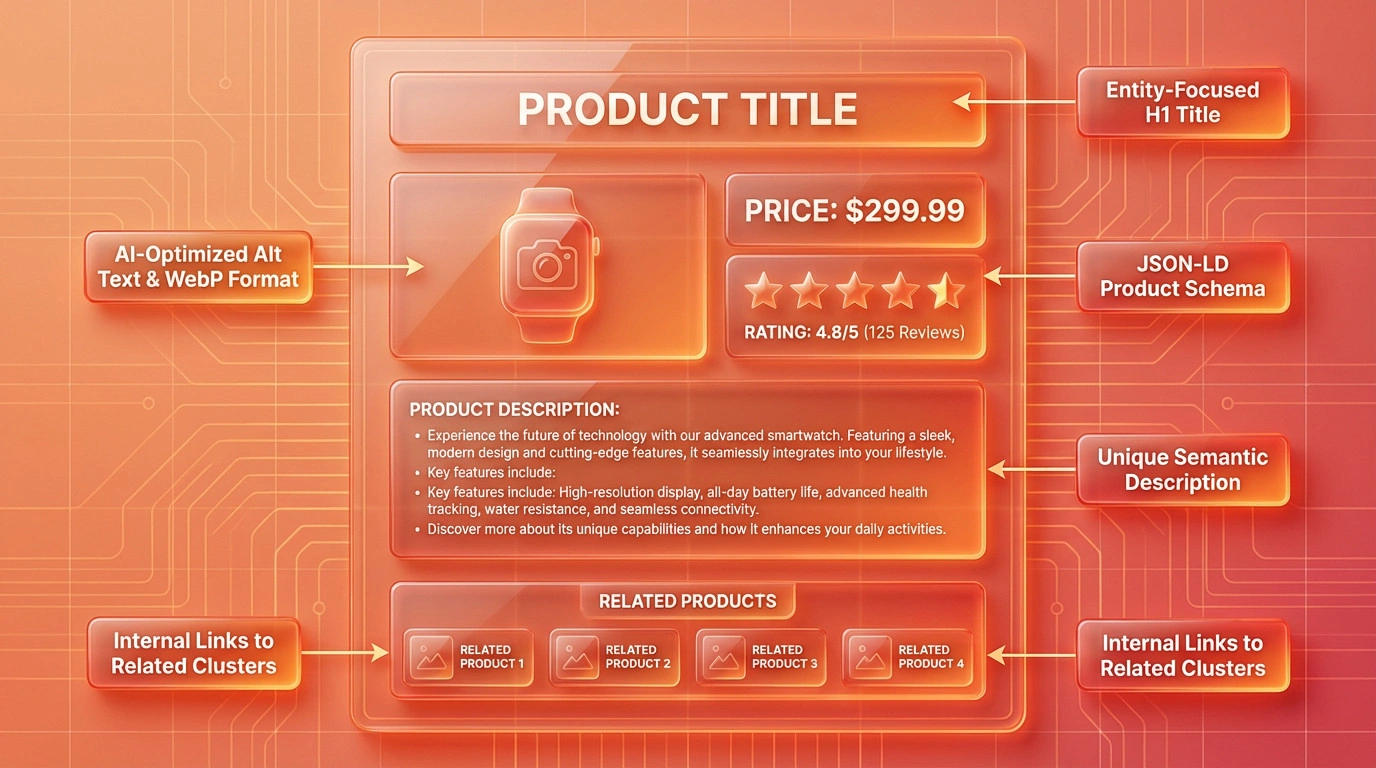
Use a distinct product name, clear description, current price, availability, variant information, delivery terms and return information. Include original images with useful alternatives, specifications and compatibility details that help a buyer decide. Keep stock, price and product information consistent between the page, cart, feed and any connected marketplace.
For Malaysian stores, state currency and delivery coverage clearly. Explain payment methods and any material conditions before checkout. Keep promotional, warranty and certification claims accurate and supported. Do not copy manufacturer text across a catalogue without adding useful product-specific information.
Control URLs and crawl paths
Review product, category, tag, attribute and filtered URLs. Filters can generate many combinations with little distinct value. Decide which combinations merit a maintained landing page and which should remain useful to shoppers without becoming indexable search pages. Use canonical and crawl controls consistently; do not block important products or categories by mistake.
Check that products are reachable through internal links, categories and the sitemap. Remove broken links, redirect discontinued products only to a genuinely relevant alternative, and return a clear not-found response when none exists. Keep pagination and sorting usable without creating confusing duplicate versions.
Structured data and shopping information
Review the product structured data generated by the theme and plugins. It should match visible information such as product name, price, currency, availability and variants. Resolve duplicate or conflicting markup rather than adding another schema plugin blindly. Structured data can make product details eligible for supported search appearances, but does not guarantee rich results, rankings or sales.
Google can use product data on the page and merchant data sources. Keep feed information consistent and review issues in the relevant merchant and search tools. Do not mark up unavailable offers or details customers cannot see.
Performance, accessibility and checkout
Measure product and category templates on real mobile devices and representative networks. Optimise images, scripts and server work based on evidence. Test keyboard operation, labels, validation, cart updates, payment return paths, order emails, tax and shipping calculations, and failure states. A fast product page is of little use if customers cannot complete an order.
Measure outcomes and maintain the catalogue
Use Search Console to review impressions, clicks and indexed URLs, and analytics or store reports to examine product views, add-to-cart events and completed orders. Treat these as different measurements. Segment by product group, device and acquisition source where the data supports it. A change in search traffic does not by itself explain revenue or profit.
Set an owner for discontinued products, redirects, price and stock accuracy, review moderation, structured-data checks and plugin updates. Revisit category structure when the catalogue changes rather than accumulating outdated filters and empty pages.
Common questions
Do WooCommerce plugins guarantee better SEO?
No. Plugins can help manage specific metadata, sitemaps or structured data, but they do not replace useful product information, sound URLs, crawlable templates or accurate store data. Check what the theme and existing plugins already output before adding another tool.
Should every product filter be indexed?
Usually not. Many filter combinations create duplicate or low-value URLs. Create indexable landing pages only for combinations with distinct demand and useful, maintained content; keep the rest easy for shoppers to use without exposing an uncontrolled URL set.
Can SEO guarantee WooCommerce sales?
No. Search visibility is one part of the buying journey. Product-market fit, price, availability, trust, delivery, checkout and competition also affect sales. Measure qualified visits and orders without promising an outcome from SEO alone.
Sources checked on 20 October 2026: WooCommerce product taxonomy guidance, Google’s e-commerce site structure guidance and product structured data guidance.