Improving WordPress Core Web Vitals starts with finding what delays the main content, shifts the layout or blocks interaction on real pages. Optimisation should address the theme, images, fonts, scripts and server response together. A high laboratory score is useful, but field data and successful user paths matter more.
Key Takeaways:
- Measure representative templates with field data as well as laboratory tests.
- Fix the largest rendering and interaction bottlenecks before minor score adjustments.
- Retest forms, navigation and tracking after removing or delaying scripts.
How to Speed Up WordPress Performance for Page Speed Insights
My idea is simple. Less is MORE.
Speed Optimisation
is Not Difficult
You just need to focus 1 thing.
Keep page SMALL size.
Keep everything minimal.
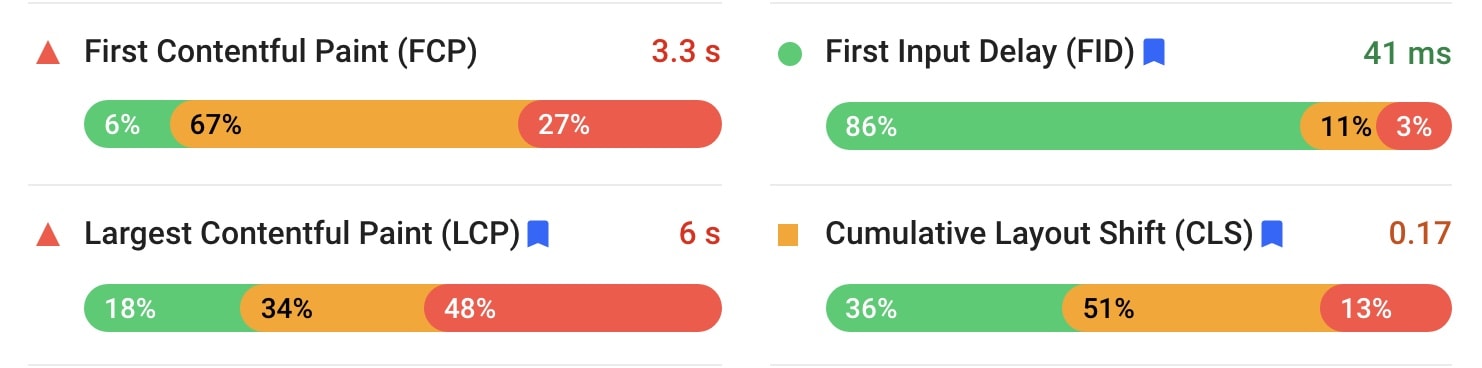
How to optimise for First Contentful Paint (FCP) / First input Delay (FID)
- Time To First Byte (TTFB) – use FAST web hosting
- Setup Cache – Swift Performance Pro / FlyingPress / Cache Enabler
- Inline the background image – CSS / Kadence Blocks
- Remove non-critical CSS/JS – perfmatters / Asset Cleanup
- Minify & Optimise CSS – Swift Performance Pro / FlyingPress /Autoptimise
- Generate Critical and Used CSS – Swift Performance Pro / FlyingPress / Autoptimise (with 3rd party service)
- Preload CSS – Blocksy / Kadence theme
- Defer JavaScript – Swift Performance Pro / FlyingPress / Async JavaScript
- Defer Inline JavaScript – Swift Performance Pro / FlyingPress / Autoptimise
- Delay 3rd party JavaScript – Swift Performance Pro / FlyingPress
- Self-host Google Font – Swift Performance Pro / FlyingPress or use System Font Stack
- Preload / prefetch DNS Queries – perfmatters / Swift Performance Pro
- Use CDN – Bunny
How to optimise for Largest Content Paint (LCP)
- Reduce element
- Don’t use slider
- Don’t use video background
- Image with correct dimensions
- optimise the images – EWWW / ShortPixel
- Use WebP format – EWWW / ShortPixel / WebP Express
- Use lightweight graphic – SVG
- Inline & lazy load the background image – CSS / Kadence Blocks
- Fast Hosting like Rocket.net
How to optimise for Cumulative Layout Shift (CLS)
- Image with correct dimensions
- Ads, embeds and iframe with dimensions
- Self-host Google Font – Swift Performance Pro / FlyingPress or use System Font Stack
- Preload Fonts – Swift Performance Pro / FlyingPress / perfmatters
- Image add width & height attributes Swift Performance Pro / FlyingPress
Still feels confusing? Here are the key things you must do on your WordPress site. These steps help fix poor Core Web Vitals URLs. Try one fix at a time. Then test your score again.
Every site is different
You need to keep optimise to get Good Score
optimise for Core Web Vitals – From Google
Are you an advanced user? Watch this short video from Google. It explains how to optimise Core Web Vitals in more depth.
Final Tips to Keep Your WordPress Site Fast
Speed is not a one-time task. Every new plugin, image, or theme update can slow your site. Audit your site each month. Remove plugins you do not use. Keep your media library lean. Pick a lightweight theme like Kadence or GeneratePress. Above all, keep your pages small. Less really is more.
Conclusion
WordPress Core Web Vitals should be measured, controlled and reversible. Fix the bottlenecks that affect real processes, then verify functionality and field experience. A score is evidence for diagnosis, not the business outcome itself.
Frequently Asked Questions
What should be measured before WordPress Core Web Vitals?
Record field data where available and test representative templates under consistent conditions. A baseline is necessary to distinguish improvement from normal variation.
Is a perfect performance score required?
No. Scores are diagnostic. Prioritise stable loading, responsive interaction and successful user paths, then address remaining test findings in proportion to their impact.
Can optimisation break website functionality?
Yes. Delaying scripts, changing caching or removing assets can affect forms, consent, navigation and tracking. Test those processes after every material change.
For ongoing operational ownership of this issue, see WPCare’s WordPress speed optimisation service.